
Qbserve
by QotoQot
macOSLicenseLifetimeIn Stock
$19.99$29.00-31%
You save $9.01 today. Instant email delivery after checkout.
Digital Delivery
Fast delivery to your email
Download & Activate
Download from the publisher, enter your key
Support Available
Our team is here to help
Refund eligibility may depend on key delivery or reveal status.
Need help?Contact Support
Genuine Licenses
A genuine license key you activate directly inside the app — no shared accounts.Authentic keys from publishers
Instant Delivery
Your license key is delivered to your email the moment payment clears. No manual review, no waiting.Get your key in seconds
Secure Checkout
All payments handled by Stripe. We never store your card details. PCI-DSS compliant.Payments processed by Stripe
Tax Included
Official stores may add tax on top of the full price. Chaocraft shows the discounted tax-included price up front.Prices shown are all tax included
About This App
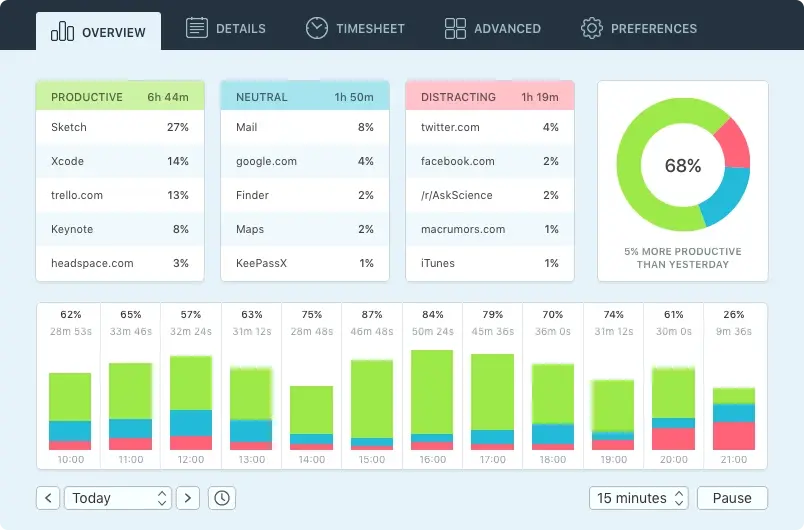
Qbserve is an automatic time tracker and productivity monitor built specifically for Mac. It records activity across apps, websites, documents, Slack teams, and supported browser content, then organizes the results into productivity reports, detailed timelines, and timesheets without requiring a manual timer. Freelancers can also create project rules, identify billable hours, generate invoices, and export data while keeping tracked history stored locally on their Mac.
Technical Details
- Publisher
- QotoQot
- Platform support
- macOS automatic time tracking
- System requirements
- Publisher lists macOS 10.10 Yosemite or newer.
- License scope
- Personal use on up to 5 Macs; business use is one license per seat
- License duration
- Perpetual
- Updates
- Publisher currently states no paid upgrades are planned.
- Delivery
- License key by email
- Setup note
- Review privacy, idle-time, and project rules before using it for client billing.
Download & Activation
Download Qbserve from https://qotoqot.com/qbserve/ Install and open Qbserve, click the key tab in the top-right corner, then enter the purchase email and license key delivered by Chaocraft. Enable the requested macOS Accessibility permission so automatic activity tracking can work.
Who Should Use Qbserve?
- Freelancers and independent consultantsBest for people who need dependable project-hour records and invoices without remembering to run a timer for every task.
- Remote workers and focused professionalsStrong fit for users who want private visibility into work patterns, communication time, and recurring distractions.
- Mac users avoiding cloud activity trackingUseful for people who prefer productivity history to remain on their own computer instead of being stored in an online account.
Features
- Automatic Mac activity and productivity trackingTrack time across apps, websites, documents, window titles, Slack teams, and supported browser content without starting a manual timer.
- Detailed reports, timelines, and timesheetsReview productive, neutral, and distracting activity across daily, weekly, and monthly reports with hour-by-hour notes and timelines.
- Rule-based project and billable-hour trackingAssign work automatically using matching rules for URLs, file paths, document names, chats, and window titles, then correct unmatched time quickly.
- Invoices, exports, alerts, and local privacyGenerate invoices in multiple languages, export JSON or CSV data, set productivity alerts, and keep tracked history stored locally on the Mac.
Problems This App Solves
- Understand where the workday actually goesUse Qbserve to replace guesses with a clear breakdown of focused work, communication, browsing, entertainment, and uncategorized activity.
- Capture freelance project hours automaticallyCreate project rules that recognize client files and websites, then turn the recorded time into timesheets and invoice items.
- Reduce distracting habits with live feedbackWatch the menu bar productivity score and configure alerts when daily goals are reached or distracting activity exceeds your limits.
Questions Before Buying
Qbserve tracks app and website activity, productivity categories, project time, billable hours, idle time, and reports directly on your Mac.
Qbserve is designed around local automatic time tracking. Review the publisher’s privacy notes and your sync/export settings if you handle sensitive client work.
For personal use, the license can cover up to 5 Macs owned by you or family members. Business use requires one license per seat.
Chaocraft buys Mac app licenses in bulk from developers, publishers, and authorized distribution partners. That lets us secure lower pricing and pass the savings on to you.
If the license key is invalid, Chaocraft will issue a refund immediately. Otherwise, digital Mac app licenses are non-refundable after the key or activation details have been delivered.
Yes. You will receive the license key and activation details needed to activate Qbserve.
User Reviews
No verified buyer reviews yet. Be the first to share your experience.
More Mac App License Deals
Browse related Mac apps with lifetime license key delivery.
 UtilitiesiStat Menus 7Handpicked companion$7.99-33%
 UtilitiesDefault Folder XHandpicked companion$29.99-25%
 UtilitiesBartender 6Handpicked companion$14.99-25%
 Developer ToolsSublime TextHandpicked companion$74.99-24%
 UtilitiesNotchNookSame Mac control workflow$17.99-28%
 UtilitiesVividSame Mac control workflow$7.99-27%
 ProductivityPDF Expert 3Popular Mac app deal$69.99-50%
 ProductivityMountain Duck 5Popular Mac app deal$34.99-29%