
Default Folder X
macOSLicenseLifetimeIn Stock
$29.99$39.95-25%
You save $9.96 today. Instant email delivery after checkout.
Digital Delivery
Fast delivery to your email
Download & Activate
Download from the publisher, enter your key
Support Available
Our team is here to help
Refund eligibility may depend on key delivery or reveal status.
Need help?Contact Support
Genuine Licenses
A genuine license key you activate directly inside the app — no shared accounts.Authentic keys from publishers
Instant Delivery
Your license key is delivered to your email the moment payment clears. No manual review, no waiting.Get your key in seconds
Secure Checkout
All payments handled by Stripe. We never store your card details. PCI-DSS compliant.Payments processed by Stripe
Tax Included
Official stores may add tax on top of the full price. Chaocraft shows the discounted tax-included price up front.Prices shown are all tax included
About This App
Default Folder X upgrades macOS Open and Save dialogs with faster folder targeting, recent-item recall, and Finder-connected navigation so file access takes fewer steps. It adds keyboard shortcuts, Quick Search, app-specific default folders, and in-dialog file actions that streamline repetitive save/open behavior across apps. For file-heavy workflows, it removes dialog friction that quietly drains daily output.
Technical Details
- Publisher
- St. Clair Software
- Platform support
- macOS file dialog enhancement
- System requirements
- Default Folder X 6.2.8 is listed for macOS 10.13 through 26.5.
- License scope
- Single-user license
- License duration
- Perpetual
- Updates
- Updates follow St. Clair Software license terms
- Delivery
- License key by email
- Setup note
- Works best with standard macOS Open and Save dialogs; custom dialogs may behave differently.
Download & Activation
Download Default Folder X from https://www.stclairsoft.com/DefaultFolderX/ Install and open Default Folder X, then choose Enter License in the General settings or the app activation prompt. Paste the license information delivered by Chaocraft. The publisher describes the license as single-user and supports use on multiple Macs as long as you are the sole user of those machines.
Who Should Use Default Folder X?
- Mac power users and file-heavy professionalsBest for users who open, save, export, attach, and organize many files across active projects every day.
- Designers, writers, developers, and editorsStrong fit for creative and technical workflows where file dialogs interrupt concentration dozens of times per day.
- Users with organized folder systemsUseful for buyers who already rely on structured project folders and want macOS dialogs to respect that organization.
Features
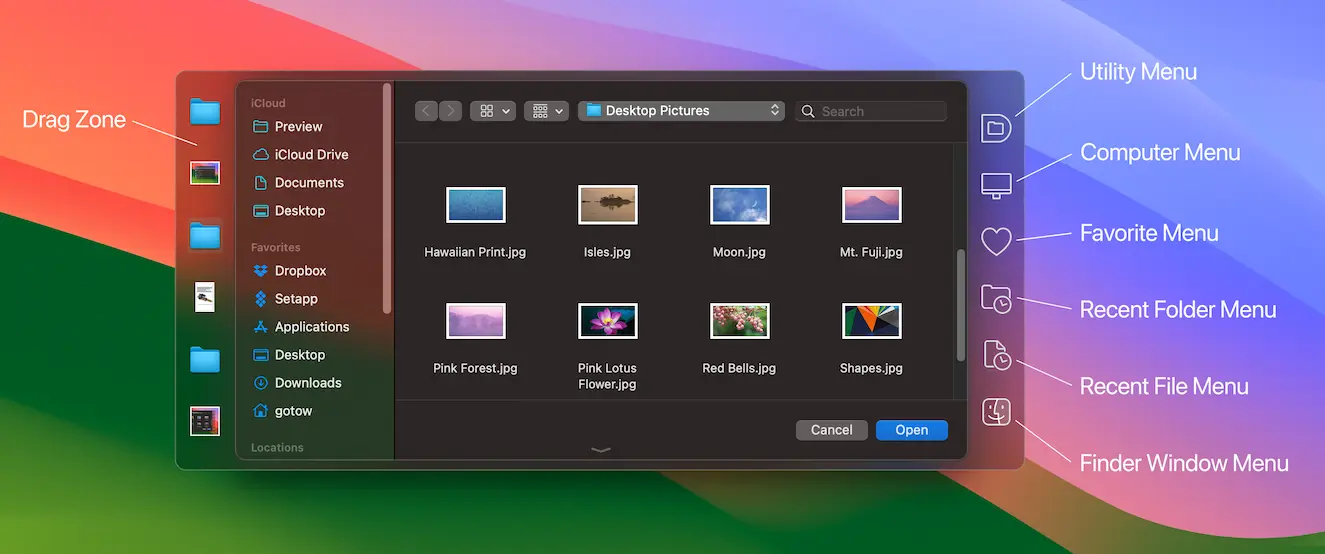
- Open and Save dialog navigationAdd a toolbar to macOS file dialogs for recent folders, favorite folders, open Finder windows, recent files, and fast folder switching.
- Per-app default foldersSet specific default Open or Save locations for individual apps so repeated export, attachment, and project workflows start in the right folder.
- Finder-powered file actionsRename, delete, reveal, duplicate, archive, inspect, and organize files from inside file dialogs without breaking your save or open flow.
- Quick Search and keyboard shortcutsJump to recently used files, folders, and apps with keyboard-driven search and configurable shortcuts for favorite locations.
Problems This App Solves
- Save project files without folder huntingUse Default Folder X when exports, attachments, screenshots, and design files need to land in specific project folders over and over.
- Move faster through client and cloud foldersKeep recent iCloud, Dropbox, OneDrive, and local project folders close when work moves across many shared locations.
- Turn Finder windows into dialog shortcutsClick an existing Finder window to send an Open or Save dialog directly to that folder instead of manually navigating the path again.
Questions Before Buying
Default Folder X enhances Open and Save dialogs with favorite folders, recent folders, Finder-window navigation, file actions, previews, and per-app default locations.
It works best with standard macOS Open and Save dialogs. Apps with custom, Java, or cross-platform dialogs may not expose the same controls.
It uses macOS permissions such as Accessibility and Screen Recording to detect and enhance file dialogs. Review the official permission prompts during setup.
Chaocraft buys Mac app licenses in bulk from developers, publishers, and authorized distribution partners. That lets us secure lower pricing and pass the savings on to you.
If the license key is invalid, Chaocraft will issue a refund immediately. Otherwise, digital Mac app licenses are non-refundable after the key or activation details have been delivered.
Yes. You will receive the license key and activation details needed to activate Default Folder X.
User Reviews
No verified buyer reviews yet. Be the first to share your experience.
More Mac App License Deals
Browse related Mac apps with lifetime license key delivery.
 UtilitiesBartender 6Handpicked companion$14.99-25%
 UtilitiesTransmit 5Handpicked companion$32.99-27%
 UtilitiesBetterZip 5Handpicked companion$17.99-28%
 ProductivityQbserveHandpicked companion$19.99-31%
 UtilitiesiStat Menus 7Same Mac control workflow$7.99-33%
 UtilitiesNotchNookSame Mac control workflow$17.99-28%
 UtilitiesVividSame Mac control workflow$7.99-27%
 UtilitiesCrossOver 26Popular Mac app deal$149.99-70%