
CloudMounter
macOSLicenseLifetimeIn Stock
$49.99$99.00-50%
You save $49.01 today. Instant email delivery after checkout.
Digital Delivery
Fast delivery to your email
Download & Activate
Download from the publisher, enter your key
Support Available
Our team is here to help
Refund eligibility may depend on key delivery or reveal status.
Need help?Contact Support
Genuine Licenses
A genuine license key you activate directly inside the app — no shared accounts.Authentic keys from publishers
Instant Delivery
Your license key is delivered to your email the moment payment clears. No manual review, no waiting.Get your key in seconds
Secure Checkout
All payments handled by Stripe. We never store your card details. PCI-DSS compliant.Payments processed by Stripe
Tax Included
Official stores may add tax on top of the full price. Chaocraft shows the discounted tax-included price up front.Prices shown are all tax included
About This App
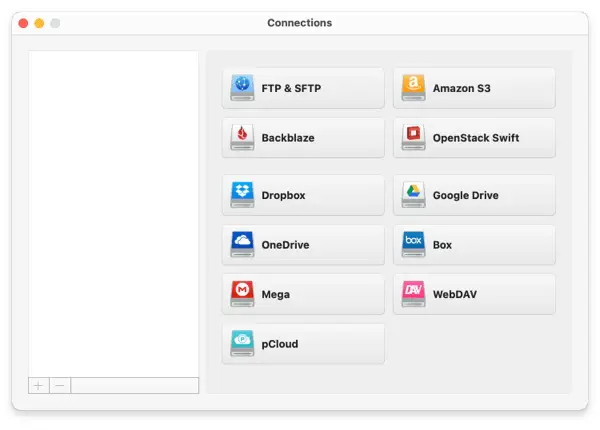
CloudMounter is a multi-cloud manager for macOS that mounts remote storage and servers as regular drives in Finder. Connect Google Drive, Dropbox, OneDrive, Amazon S3, Backblaze B2, Box, MEGA, pCloud, OpenStack Swift, WebDAV, FTP, and SFTP accounts without installing a separate sync client for every service. You can browse and edit remote files with familiar Mac apps, move data between connected services, work with multiple accounts from the same provider, and reduce local storage use by keeping large files in the cloud. CloudMounter also supports offline files and client-side AES-256 encryption for protecting sensitive cloud data.
Technical Details
- Publisher
- Electronic Team, Inc.
- Edition
- Personal Lifetime
- Platform support
- macOS cloud and server mounting
- System requirements
- Confirm the current CloudMounter macOS requirement before installing.
- License scope
- Personal lifetime license for 1 Mac
- License duration
- Lifetime
- Updates
- Updates follow Electronic Team license terms
- Delivery
- License key by email
- Setup note
- Remote files may depend on provider access, network quality, and your storage account permissions.
Download & Activation
Download CloudMounter for Mac from https://cloudmounter.net/downloads-mac.html Install and open the direct-download version, then use the app activation option or license prompt to enter the activation details delivered by Chaocraft. This Personal license is for one Mac.
Who Should Use CloudMounter?
- Mac users with several cloud accountsBest for people juggling personal and business storage across multiple providers who want one consistent Finder-based workflow.
- Developers, site managers, and IT professionalsStrong fit for users who regularly connect to SFTP, WebDAV, S3, Backblaze, or OpenStack resources and need quick desktop access.
- Storage-conscious laptop usersUseful for MacBook owners who want access to large remote libraries without allowing every service to sync a complete local copy.
Features
- Mount cloud storage directly in FinderConnect Google Drive, Dropbox, OneDrive, Box, MEGA, pCloud, and other services as familiar Mac drives instead of switching among separate provider apps.
- Connect SFTP, FTP, WebDAV, and object storageWork with remote servers, Amazon S3 buckets, Backblaze B2, and OpenStack Swift from the same connection manager used for consumer cloud accounts.
- Move files across services without a sync mazeDrag files between mounted accounts in Finder, use multiple accounts from one provider, and avoid keeping a complete local copy of every cloud library.
- Offline access and client-side encryptionKeep selected remote files available offline and protect sensitive cloud folders with AES-256 encryption before their contents leave the Mac.
Problems This App Solves
- Replace a collection of cloud sync clientsBring personal and work storage into Finder while reducing menu bar clutter, duplicated local files, and constant switching between provider interfaces.
- Manage websites and infrastructure from FinderMount SFTP servers, WebDAV shares, and S3 buckets for routine uploads, file edits, backups, and content deployment using normal Mac file tools.
- Keep large archives remote but accessibleBrowse media, project archives, and backups without storing the full collection locally, then mark the files needed for travel or disconnected work.
Questions Before Buying
CloudMounter mounts cloud storage and remote servers as Mac drives, including popular cloud providers and protocols such as FTP, SFTP, and WebDAV depending on the current app version.
CloudMounter is designed to mount remote storage in Finder instead of syncing everything by default. Individual files may still be cached while opened or transferred.
This listing is for a Personal Lifetime license for 1 Mac. Buy the correct quantity if you need to activate more machines.
Chaocraft buys Mac app licenses in bulk from developers, publishers, and authorized distribution partners. That lets us secure lower pricing and pass the savings on to you.
If the license key is invalid, Chaocraft will issue a refund immediately. Otherwise, digital Mac app licenses are non-refundable after the key or activation details have been delivered.
Yes. You will receive the license key and activation details needed to activate CloudMounter.
User Reviews
No verified buyer reviews yet. Be the first to share your experience.
More Mac App License Deals
Browse related Mac apps with lifetime license key delivery.
 ProductivityMountain Duck 5Handpicked companion$34.99-29%
 UtilitiesTransmit 5Handpicked companion$32.99-27%
 UtilitiesMicrosoft NTFS for Mac by TuxeraHandpicked companion$18.99-30%
 UtilitiesBetterZip 5Handpicked companion$17.99-28%
 UtilitiesArchiver 5Same file and storage workflow$19.99-23%
 UtilitiesCrossOver 26Popular Mac app deal$149.99-70%
 UtilitiesiStat Menus 7Popular Mac app deal$7.99-33%
 UtilitiesAdGuardPopular Mac app deal$43.99-45%