
Loopback
by Rogue Amoeba
macOSLicenseLifetimeIn Stock
$74.99$99.00-24%
You save $24.01 today. Instant email delivery after checkout.
Digital Delivery
Fast delivery to your email
Download & Activate
Download from the publisher, enter your key
Support Available
Our team is here to help
Refund eligibility may depend on key delivery or reveal status.
Need help?Contact Support
Genuine Licenses
A genuine license key you activate directly inside the app — no shared accounts.Authentic keys from publishers
Instant Delivery
Your license key is delivered to your email the moment payment clears. No manual review, no waiting.Get your key in seconds
Secure Checkout
All payments handled by Stripe. We never store your card details. PCI-DSS compliant.Payments processed by Stripe
Tax Included
Official stores may add tax on top of the full price. Chaocraft shows the discounted tax-included price up front.Prices shown are all tax included
About This App
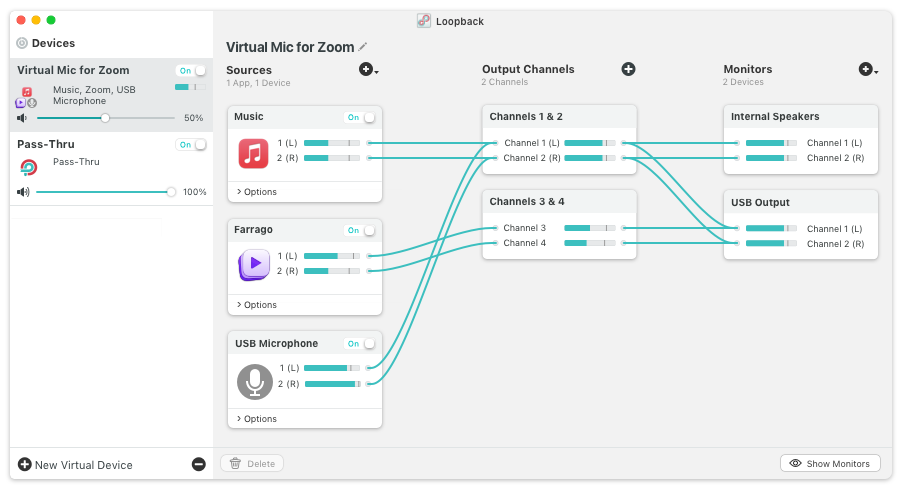
Loopback is cable-free audio routing software for Mac that creates virtual audio devices available system-wide. You can combine app audio and physical inputs, build custom channel maps, and route sound into Zoom, FaceTime, GarageBand, and other tools without external hardware mixers. With pass-thru devices and flexible monitoring, Loopback gives creators and technical teams repeatable control over complex Mac audio workflows.
Technical Details
- Publisher
- Rogue Amoeba
- Platform support
- macOS virtual audio routing
- System requirements
- Confirm the current macOS requirement on Rogue Amoeba before installing.
- License scope
- Single-user license for your own Macs
- License duration
- Perpetual
- Updates
- Current major-version updates; future major upgrades may be paid.
- Delivery
- License key by email
- Setup note
- Use this when you need virtual audio devices; use Audio Hijack for recording-focused sessions.
Download & Activation
Download Loopback from https://rogueamoeba.com/loopback/ Open the app, choose Loopback → License, and enter your license key to register. Requires macOS 14.5 or later.
Who Should Use Loopback?
- Podcasters, streamers, and broadcastersBest for creators who need stable virtual devices and predictable routing across recurring production sessions.
- Musicians, trainers, and remote teamsStrong fit for users connecting DAWs, conferencing tools, and presentation apps that require advanced source control.
- Teams with high-volume execution needsStrong fit for teams using Loopback in recurring production cycles where predictable speed and quality directly affect outcomes.
Features
- Combine audio sources in one Loopback deviceCreate a system-wide virtual device that combines app audio and hardware inputs for recording, calls, and streaming.
- Channel-level routing and mappingConfigure multi-channel outputs and custom wiring paths to direct audio exactly where each workflow needs it.
- Pass-Thru and monitoring controlsUse Pass-Thru devices and monitoring options to move audio between apps with minimal setup friction.
- Visual wiring with studio-grade power and controlBuild and modify complex signal paths quickly with a patch-bay style interface instead of hidden system routing menus.
Problems This App Solves
- Bypass native macOS routing limitsUse Loopback when default Mac audio settings cannot combine multiple sources or feed virtual inputs reliably.
- Stabilize mixed audio for calls and streamsBuild repeatable routing for podcasts, livestreams, demos, and remote sessions where voice and app audio must stay in sync.
- Fix recurring delivery slowdownsUse Loopback when fragmented steps and repetitive manual checks delay handoffs, especially in deadline-heavy work.
Questions Before Buying
Loopback creates virtual audio devices so you can combine microphones, app audio, browser audio, instruments, and system sound into routable inputs for other Mac apps.
Choose Loopback when you need virtual audio devices and routing between apps. Choose Audio Hijack when the main job is recording, processing, or applying audio effects chains.
This listing follows Rogue Amoeba’s single-user model, which covers the Macs you personally use. It is not a studio-wide or shared-user license.
Chaocraft buys Mac app licenses in bulk from developers, publishers, and authorized distribution partners. That lets us secure lower pricing and pass the savings on to you.
If the license key is invalid, Chaocraft will issue a refund immediately. Otherwise, digital Mac app licenses are non-refundable after the key or activation details have been delivered.
Yes. You will receive the license key and activation details needed to activate Loopback.
User Reviews
No verified buyer reviews yet. Be the first to share your experience.
More Mac App License Deals
Browse related Mac apps with lifetime license key delivery.
 AudioAudio HijackHandpicked companion$49.99-28%
 AudioSoundSource 6Handpicked companion$34.99-29%
 AudioFarragoHandpicked companion$39.99-27%
 AudioPiezoHandpicked companion$19.99-31%
 UtilitiesCrossOver 26Popular Mac app deal$149.99-70%
 UtilitiesiStat Menus 7Popular Mac app deal$7.99-33%
 ProductivityPDF Expert 3Popular Mac app deal$69.99-50%
 UtilitiesAdGuardPopular Mac app deal$43.99-45%