
AirParrot 3
macOSLicenseLifetimeIn Stock
$19.99$27.99-29%
You save $8.00 today. Instant email delivery after checkout.
Digital Delivery
Fast delivery to your email
Download & Activate
Download from the publisher, enter your key
Support Available
Our team is here to help
Refund eligibility may depend on key delivery or reveal status.
Need help?Contact Support
Genuine Licenses
A genuine license key you activate directly inside the app — no shared accounts.Authentic keys from publishers
Instant Delivery
Your license key is delivered to your email the moment payment clears. No manual review, no waiting.Get your key in seconds
Secure Checkout
All payments handled by Stripe. We never store your card details. PCI-DSS compliant.Payments processed by Stripe
Tax Included
Official stores may add tax on top of the full price. Chaocraft shows the discounted tax-included price up front.Prices shown are all tax included
About This App
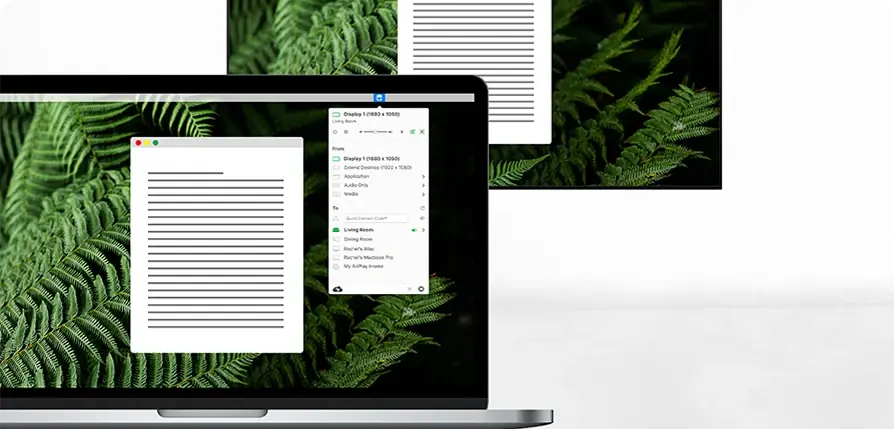
AirParrot 3 lets your Mac mirror, extend, or stream media wirelessly to Apple TV, Chromecast, AirPlay audio devices, and computers running Reflector. Use it for presentations, classrooms, living-room streaming, and quick wireless display workflows without extra adapters.
Technical Details
- Publisher
- Squirrels LLC
- Listed version
- AirParrot 3
- Platform support
- macOS sender app
- System requirements
- Publisher lists macOS 10.15 or later for AirParrot 3 for Mac.
- License scope
- Mac-only license for 1 device
- License duration
- Perpetual for version 3
- Updates
- AirParrot 3 updates only; future major versions may require a separate license.
- Delivery
- License key by email
- Setup note
- Confirm your target receiver and local network support wireless mirroring before activation.
Download & Activation
Download AirParrot 3 from https://www.airsquirrels.com/airparrot Install and launch AirParrot, then enter the license key delivered by Chaocraft in the app activation or license prompt. The publisher lists macOS 10.15 or later for AirParrot 3 for Mac and describes the Mac-only purchase as a 1-device license.
Who Should Use AirParrot 3?
- Mac presenters and trainersBest for users who frequently share a Mac screen to TVs, projectors, or receivers during lessons, demos, and meetings.
- Home media and Apple TV usersStrong fit for buyers who want more control over sending Mac content to living-room receivers and AirPlay audio devices.
- Mixed-device workplacesUseful for rooms that combine Macs, Chromecast, Apple TV, and Reflector receivers and need one sender app to cover more scenarios.
Features
- Wireless screen mirroring from MacMirror a Mac display to supported Apple TV, Chromecast, Reflector, and AirPlay receiver setups without HDMI adapters or capture hardware.
- Extended desktop over supported receiversTurn compatible wireless receivers into extra display space when you need a second-screen presentation or workspace without a cable.
- Media and audio streamingStream video, audio, presentations, and media files from a Mac to compatible receivers, including workflows with AirPlay audio devices.
- Quick Connect and network discoveryUse AirParrot's receiver discovery and Quick Connect options to reach available devices on networks where standard discovery can be limited.
Problems This App Solves
- Present to Apple TV or ChromecastUse AirParrot 3 when a room has a compatible receiver and the Mac needs to share a full screen, one app, or a media file wirelessly.
- Add wireless display flexibility to older setupsHelp older Macs or mixed receiver environments send content where native mirroring options are missing, limited, or too rigid.
- Stream media around a home or classroomSend videos, music, presentations, and screen content to TVs, speakers, or computers running Reflector for entertainment, teaching, or review.
Questions Before Buying
AirParrot 3 mirrors or extends your Mac display to receivers such as Apple TV, Chromecast, and compatible Reflector devices, making it useful for classrooms, demos, and conference-room screens.
Yes. This Chaocraft listing is for an AirParrot 3 Mac-only, 1-device license. Buy only if the Mac you plan to use is the machine you want to activate.
Wireless mirroring depends on your receiver and network quality. Confirm your target device is supported and use a stable local network for presentations or video playback.
Chaocraft buys Mac app licenses in bulk from developers, publishers, and authorized distribution partners. That lets us secure lower pricing and pass the savings on to you.
If the license key is invalid, Chaocraft will issue a refund immediately. Otherwise, digital Mac app licenses are non-refundable after the key or activation details have been delivered.
Yes. You will receive the license key and activation details needed to activate AirParrot 3.
User Reviews
No verified buyer reviews yet. Be the first to share your experience.
More Mac App License Deals
Browse related Mac apps with lifetime license key delivery.
 UtilitiesReflector 4Handpicked companion$19.99-29%
 UtilitiesNotchNookHandpicked companion$17.99-28%
 UtilitiesShareMouseHandpicked companion$69.99-30%
 UtilitiesVividHandpicked companion$7.99-27%
 UtilitiesCrossOver 26Popular Mac app deal$149.99-70%
 UtilitiesiStat Menus 7Popular Mac app deal$7.99-33%
 UtilitiesAdGuardPopular Mac app deal$43.99-45%
 UtilitiesArchiver 5Popular Mac app deal$19.99-23%